Reading Time 5
Number of Words 1085
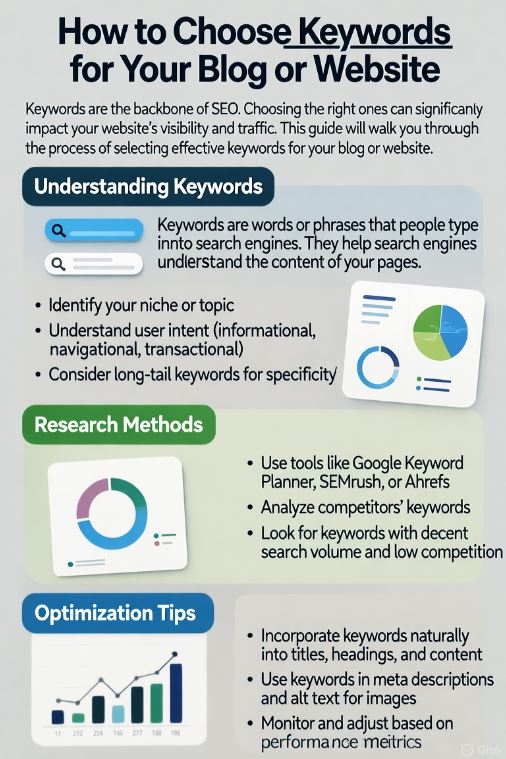
You’ve spent hours writing a blog post, only to realize no one is reading it.
Your traffic is flat, your content gets buried on page 5 of Google, and you’re wondering what went wrong.
The truth is simple: you’re targeting the wrong keywords.
Without the right keywords, even the best-written article can go completely unnoticed.
Search engines don’t know what your content is about, and your potential readers never find you.
But here’s the good news, you don’t need to be an SEO expert to fix it.
With the right keyword strategy, you can attract the right audience, boost your organic traffic, and turn your blog or website into a growth engine.
In this step-by-step guide, you’ll learn exactly how to choose keywords that rank, from brainstorming and research to placement and tracking, using proven techniques that work even if you’re just starting out.
Why Keywords Matter for SEO
Keywords are the bridge between what people are searching for and the content you offer. When you use the right keywords, search engines like Google understand your topic, and users can find your content easily.
In short:
👉 Good keywords = better visibility, more clicks, and more growth.
If your keywords are off-target, your content may never reach the audience you want — no matter how well it’s written.
Step 1: Understand What Keywords Really Are
A keyword is any word or phrase someone types into a search engine.
For example:
-
“best laptop for students”
-
“how to start a blog”
-
“SEO tools for beginners”
There are two main types of keywords:
| Type | Example | Purpose |
|---|---|---|
| Short-tail | "blog keywords" | High volume, but very competitive |
| Long-tail | "how to choose keywords for a blog" | Lower competition, higher conversion rate |
For beginners, long-tail keywords are the best starting point. They’re more specific, easier to rank for, and attract people who are ready to take action.
Step 2: Identify Your Blog or Website Topic
Before you search for keywords, define what your website is about.
Ask yourself:
-
What topics do I want to cover?
-
What problems does my audience have?
-
What type of readers or customers do I want to attract?
Example:
If your site is about tech gadgets, your core topics might be mini PCs, mobile phones, or smart home devices.
➡️ You can explore reviews on minipc-review.com for inspiration.
Once your niche is clear, finding relevant keywords becomes much easier.
Step 3: Brainstorm Seed Keywords
Start with seed keywords — simple terms related to your main topic. These are the foundation for discovering more ideas.
For example, if your niche is blogging, your seed keywords might be:
-
blog ideas
-
content writing
-
keyword research
-
SEO for beginners
From here, you’ll expand these into dozens of long-tail keywords in the next step.
Step 4: Use Keyword Research Tools
You don’t need expensive tools to start. Several free and affordable keyword tools can help you find what people are actually searching for.
Here are some recommended tools:
| Tool | Type | Best for |
|---|---|---|
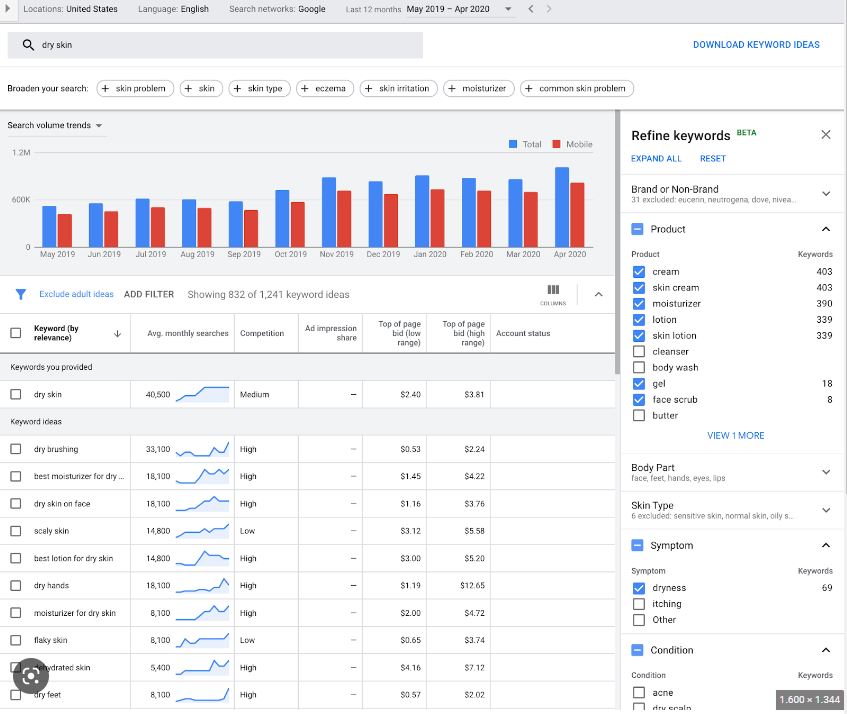
| Google Keyword Planner | Free | Search volume & competition |
| Ubersuggest | Freemium | Keyword ideas & SEO difficulty |
| AnswerThePublic | Free | Questions and search intent |
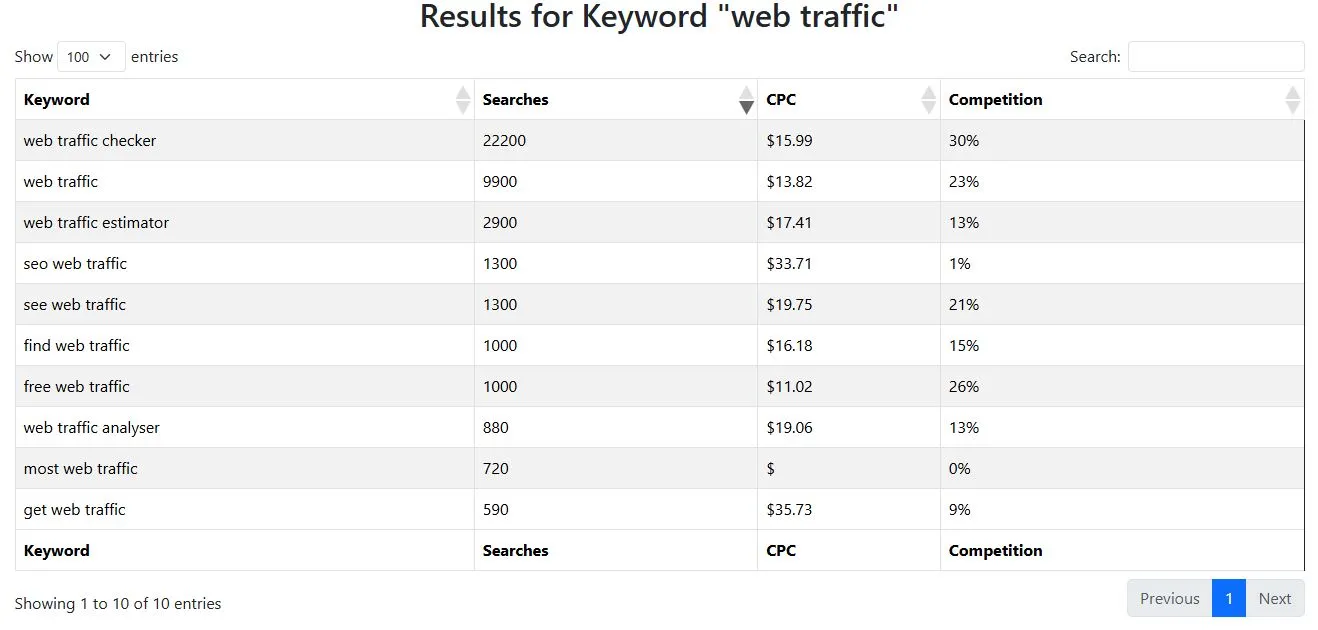
| Lookkle Keyword Explorer | Free | Competitor keyword & traffic analysis |
👉 Pro Tip:
Use Lookkle Keyword Explorer to see which keywords your competitors are ranking for and estimate their traffic sources. This helps you target realistic opportunities.
Use Google Keyword Planner:
Step 5: Analyze Keyword Metrics
Not every keyword is worth targeting. Focus on those that balance search volume, competition, and intent.
Here’s what to check:
-
Search Volume – How many people search for the term each month.
Aim for keywords with at least 100–1,000 monthly searches (as a beginner). -
Keyword Difficulty (KD) – How hard it is to rank for that keyword.
Stick with KD below 40 until you gain domain authority. -
Search Intent – Why people are searching.
Are they looking to learn, buy, or compare?
Match your content to their intent.
| Intent Type | Example Keyword | Best Content Type |
|---|---|---|
| Informational | "how to choose blog keywords" | Blog post or guide |
| Commercial | "best SEO tools for beginners" | Review or comparison |
| Transactional | "buy keyword research tool" | Product page |
Step 6: Check What’s Already Ranking
Before writing, search your keyword on Google and analyze the top 10 results:
-
What kind of pages rank? (blogs, products, videos?)
-
What keywords do they include in titles and headers?
-
What questions are answered in their content?
This process — known as SERP analysis — helps you understand what Google considers “valuable” for that keyword.
💡 You can also use Lookkle’s Top Pages & Competitors tool to see which of your competitors’ articles are ranking for those same topics.
Step 7: Choose and Organize Your Keywords
Once you have your keyword list, organize it by topic cluster.
A topic cluster helps you build a strong site structure and internal linking.
Example: Blogging Keywords Cluster
-
Main Keyword: how to start a blog
-
Long-tail 1: how to choose blog topics
-
Long-tail 2: how to find blog keywords
-
Long-tail 3: SEO tips for new bloggers
-
Each of these can become its own blog post linked to a central “pillar” page.
Step 8: Place Keywords Naturally in Your Content
Keyword placement matters for SEO. But avoid overusing them — it looks spammy.
Here’s where to include your target keyword:
✅ Page title (H1)
✅ First paragraph
✅ One H2 or H3 heading
✅ Meta description
✅ Image alt text
✅ URL slug
✅ Naturally throughout the text (1–2% density)
Step 9: Write for Humans, Optimize for Search Engines
Google rewards helpful, original content.
Focus on solving readers’ problems first — then optimize for search.
-
Use short paragraphs (2–3 lines).
-
Add bullet points and tables for clarity.
-
Include real examples or mini case studies.
-
Use natural variations of your keywords (synonyms and related terms).
Step 10: Track and Refine Your Keywords
SEO is not “set and forget.” Use analytics tools to measure your progress.
Track:
-
Which pages bring the most organic traffic
-
Which keywords are driving visitors
-
What’s ranking in Google’s top 10
Free tools like Google Search Console and Lookkle SEO Site Explorer can show which keywords are improving or declining.
Keep updating your content and adding new related topics — consistency builds authority.
Bonus: Common Keyword Mistakes to Avoid
❌ Targeting only high-volume keywords
❌ Ignoring search intent
❌ Keyword stuffing
❌ Skipping meta descriptions
❌ Forgetting to update old content
Remember: SEO success is about strategy and patience, not shortcuts.
Practical Example: Comparing Two Keyword Choices
| Keyword Option | Search Volume | Difficulty | Intent | Recommended? |
|---|---|---|---|---|
| "blog keywords" | 12,000 | 68 | Informational | ❌ Too competitive |
| "how to choose keywords for a blog" | 900 | 32 | Informational | ✅ Perfect for beginners |
FAQs: Keyword Research for Beginners
1. How many keywords should I use per blog post?
Focus on one main keyword and 2–3 related secondary keywords. This keeps your content focused and natural.
2. How do I know if my keyword is too competitive?
Use tools like Lookkle SEO Site Explorer or Ubersuggest — if the keyword difficulty is above 50 and your site is new, it’s better to choose something easier.
3. Should I use the same keywords on multiple pages?
No. Each page should target a unique keyword to avoid keyword cannibalization.
4. How often should I update my keywords?
Review them every 3–6 months. SEO trends and user interests change over time.
5. Can I make money with SEO and keyword research?
Yes. Once your content ranks, you can monetize it through ads, affiliate links, or newsletters. Learn more at NewsletterAlways.com, which focuses on online business growth and passive income.



