Reading Time 2
Number of Words 390
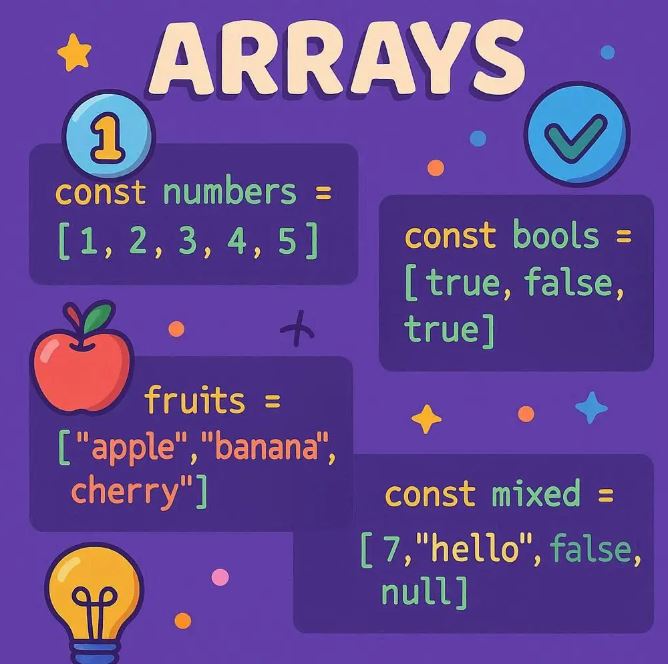
Arrays are one of the most fundamental data structures in JavaScript, allowing developers to store and organize multiple values in a single variable.
Whether you are handling a list of strings, numbers, objects, or mixed data types, arrays provide flexibility and powerful methods to manipulate data effectively.
What Is an Array?
An array is an ordered collection of elements where each element has a numeric index starting at zero. The elements can be of any type: numbers, strings, booleans, objects, or even other arrays.
Creating Arrays
There are several ways to create arrays in JavaScript:
1. Using array literals (the most common and recommended):
const fruits = ['apple', 'banana', 'cherry'];
2. Using the Array constructor with a fixed size:
const arr = new Array(3); // Creates an array of length 3 with empty slots
3. Using the Array constructor with elements:
const colors = new Array('red', 'green', 'blue');
Accessing Array Elements
Elements in an array are accessed by their index, starting at 0:
console.log(fruits[0]); // apple console.log(fruits[1]); // banana
Adding Elements
To add elements to an array, you can use several methods. The simplest is push() which adds an element to the end:
fruits.push('orange'); console.log(fruits); // ['apple', 'banana', 'cherry', 'orange']
Alternatively, to add an element at the beginning, use unshift():
fruits.unshift('mango'); console.log(fruits); // ['mango', 'apple', 'banana', 'cherry', 'orange']
Removing Elements
-
Remove the last element with
pop():
const lastFruit = fruits.pop(); console.log(lastFruit); // orange console.log(fruits); // ['mango', 'apple', 'banana', 'cherry']
-
Remove the first element with
shift():
const firstFruit = fruits.shift(); console.log(firstFruit); // mango console.log(fruits); // ['apple', 'banana', 'cherry']
Other Useful Array Methods
-
splice(start, deleteCount, ...): Remove and optionally insert elements
fruits.splice(1, 1, 'pear', 'kiwi'); // Removes 1 element at index 1 and adds 'pear', 'kiwi' console.log(fruits); // ['apple', 'pear', 'kiwi', 'cherry']
-
slice(start, end): Create a shallow copy of part of an array
const someFruits = fruits.slice(1, 3); console.log(someFruits); // ['pear', 'kiwi']
-
indexOf(value): Find the index of a value
console.log(fruits.indexOf('kiwi')); // 2
Arrays with Mixed Data Types
JavaScript arrays can hold data of mixed types:
const mixedArray = ['hello', 42, true, { name: 'Alice' }, [1, 2, 3]]; console.log(mixedArray[3].name); // Alice console.log(mixedArray[4][1]); // 2
Iterating Over Arrays
Common ways to loop through arrays:
-
Using
forloop:
for(let i = 0; i < fruits.length; i++) { console.log(fruits[i]); }
-
Using
forEach()method:
fruits.forEach(fruit => { console.log(fruit); });
-
Using ES6
for...ofloop:
for (const fruit of fruits) { console.log(fruit); }
Modern JavaScript Array Features (ES6+)
-
map(): Transform each element and create a new array
const upperFruits = fruits.map(fruit => fruit.toUpperCase()); console.log(upperFruits);
-
filter(): Select elements based on a condition
const filtered = fruits.filter(fruit => fruit.startsWith('p')); console.log(filtered); // ['pear']
-
reduce(): Accumulate values into a single result
const sum = [1, 2, 3, 4].reduce((acc, curr) => acc + curr, 0); console.log(sum); // 10