Reading Time 2
Number of Words 335
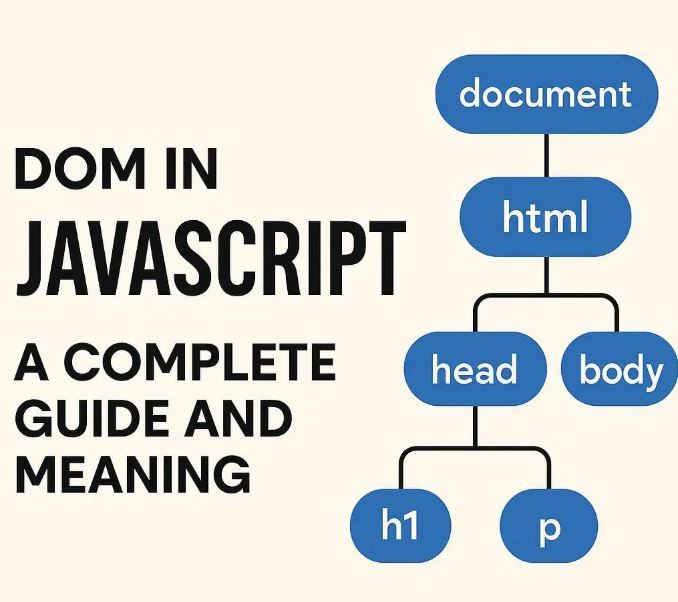
The Document Object Model (DOM) in JavaScript represents the structured layout of a web page, allowing developers to interact dynamically with HTML elements, modify content, and respond to user actions. Understanding how to work with the DOM is fundamental for creating interactive and responsive web applications.
What Is the DOM?
The DOM is a programming interface for HTML and XML documents. It treats the page as a hierarchical tree structure made of nodes, where each node corresponds to an element, attribute, or piece of text in the document.
For instance, the HTML tag <html>, a <div>, or a paragraph <p> are nodes in the DOM tree. This tree structure enables JavaScript to access and manipulate any part of the web page dynamically.
The Core DOM Objects: document and window
Two main global objects represent the DOM environment in browsers:
window: Represents the browser window and includes properties and methods for controlling the browser itself, like opening new windows, handling storage, timers, and more.document: Refers specifically to the loaded HTML document. Throughdocument, you can access and manipulate all elements of the page.
Accessing and Modifying Elements
To work with DOM elements, you first select them using various methods:
- By ID:
const header = document.getElementById('header');
- By Class Name:
const cards = document.getElementsByClassName('card');
- By Tag Name:
const paragraphs = document.getElementsByTagName('p');
- Using CSS selectors (most versatile):
const mainButton = document.querySelector('.btn-primary');
const allButtons = document.querySelectorAll('button');
Once selected, you can change the element’s content, style, attributes, or structure:
mainButton.textContent = 'Click Me!';
mainButton.style.backgroundColor = 'blue';
mainButton.setAttribute('disabled', true);
Creating and Adding Elements Dynamically
You can create new nodes and add them to the document:
const newDiv = document.createElement('div');
newDiv.textContent = 'Hello World!';
document.body.appendChild(newDiv);
You can also remove elements:
const elementToRemove = document.querySelector('.old-element');
elementToRemove.remove();
Event Handling
The DOM enables interactive behavior using event listeners:
mainButton.addEventListener('click', function() {
  alert('Button clicked!');
});
Browser Storage: Saving Data Locally
The window object provides access to localStorage to store data persistently in the browser:
window.localStorage.setItem('username', 'Alice');
const user = window.localStorage.getItem('username');
console.log(user); // Outputs: Alice
// Data remains until explicitly cleared.
Why DOM Mastery Matters
Modern web applications heavily rely on dynamic content updates without reloading pages. Mastering the DOM allows you to:
- Update page content and styles dynamically.
- Handle user interactions smoothly.
- Enhance user experience and build single-page applications (SPAs).
- Work with frameworks and libraries like React, Angular, or Vue, which interact with the DOM extensively.