Today's SEO doesn't just depend on your content or keywords. Backlinks remain one of the most important factors in ranking a website.
Not all links are created equal: some can help you, and others can even hurt your rankings.
This is where Lookkle's Backlink Checker comes in, a practical tool for analyzing and optimizing your link profile.
What is Lookkle's Backlink Checker?
The Lookkle Backlink Checker is an online tool designed to analyze, audit, and monitor inbound links (backlinks) pointing to a website. In the world of SEO, backlinks are one of the most important ranking factors, since they act as “votes of trust” from other sites towards your content.
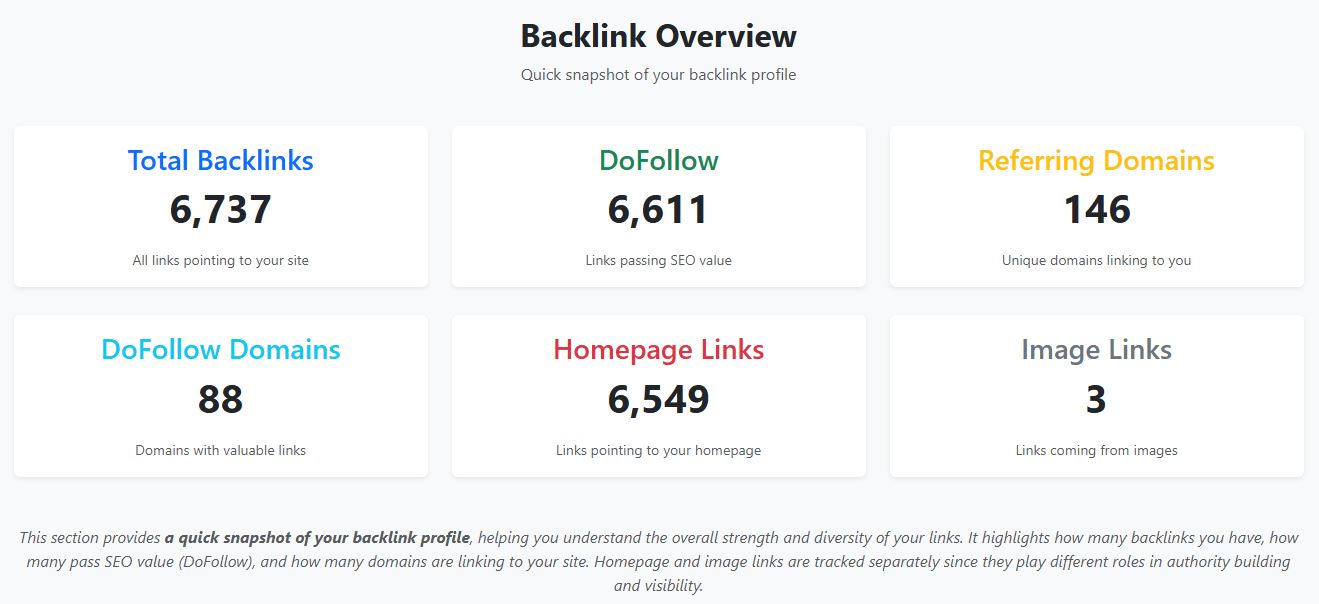
This tool collects, organizes, and presents detailed information about those links, giving you the power to understand:
-
Who is linking to your website
-
See a complete list of domains and pages that link back to you.
-
This can include blogs, news sites, forums, social media, directories, and more.
-
-
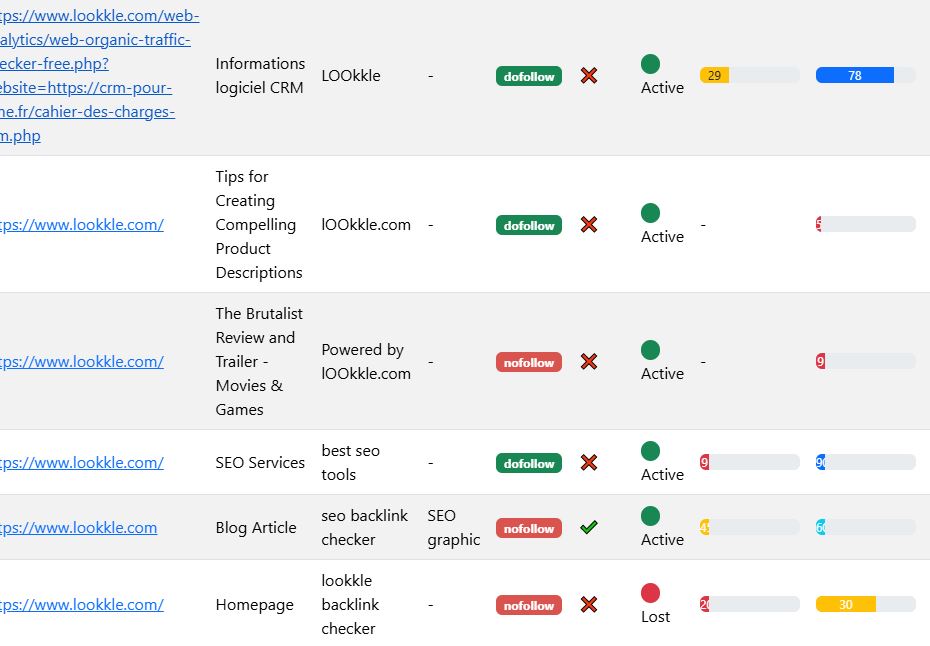
The quality of each backlink
-
Not all links carry the same weight. A link from a high-authority, relevant site is far more valuable than one from a spammy page.
-
Lookkle evaluates link quality with metrics such as estimated authority, topical relevance, and whether it is DoFollow or NoFollow.
-
-
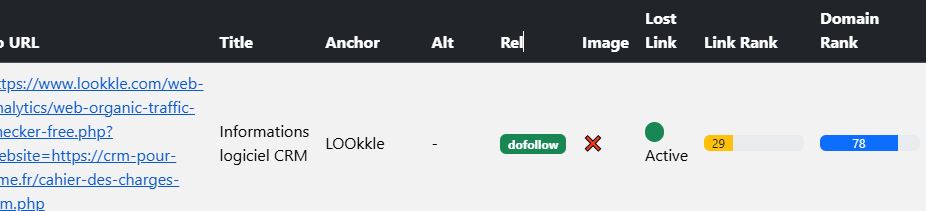
Active vs. broken backlinks
-
The tool checks if backlinks are still live or if they have become broken over time.
-
Broken links mean lost authority and missed traffic opportunities.
-
-
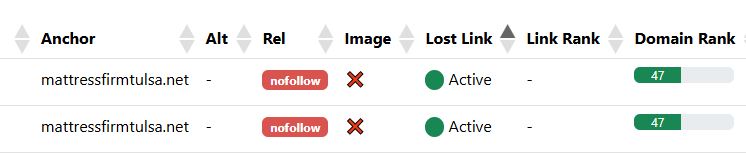
SEO risks (toxic backlinks)
-
Identifies suspicious backlinks from link farms, penalized domains, or irrelevant sources.
-
Toxic backlinks can damage your site’s rankings and may even trigger Google penalties.
-
-
Competitor backlink analysis
-
You can analyze any domain, not just your own.
-
This allows you to study competitors, discover which websites link to them, and uncover opportunities to replicate or surpass their link-building strategies.
-
Step 1: Enter Your URL into the Tool
1.1. Which URL should you enter? — examples and why it matters
Before pasting any address, decide what exactly you want to audit.
Each choice gives you different insights:
-
Root Domain (e.g.,
https://example.com)
→ Audits all backlinks pointing to any page of the domain. Best option for a global overview. -
Subdomain (e.g.,
https://blog.example.com)
→ Useful if you want to audit a specific section (blog, store, support portal).
The tool also analyzes all of the website's backlinks, but at the top of the analysis table, it will display the backlinks that point to the exact address you entered. -
Directory or path (e.g.,
https://example.com/seo-guide/)
→ Perfect if you want to see links pointing to a landing page or a single content hub.
Just like in the previous step, the tool analyzes all of the website's backlinks, but they are sorted so that it first displays the backlinks pointing to the exact address you entered. -
Exact URL with or without
www/ trailing slash
→ Enter the specific variant you want to test. Tools usually consolidate redirects and canonicals, but it’s still a good idea to test both (https://example.comandhttps://www.example.com).
Rule of thumb: If unsure, start with the root domain for a full view, then run additional checks on subdomains or pages based on findings.
1.2. Correct format & technical details (things to avoid)
-
Always include the protocol (
https://orhttp://) if required. Although it's fine to include only the domain name. -
Avoid partial strings (like just
example) — use the full URL. -
Check for redirects: if your site redirects (
http→https, ornon-www→www), the tool may report backlinks under the first detected version. Run both if necessary. -
If your site uses a canonical tag pointing elsewhere, keep that in mind when interpreting results.
1.3. Common configuration options (and how to choose wisely)
When entering your URL, the tool may show additional options:
-
Crawl depth: how deep the crawler should go.
-
Recommendation: start with direct backlinks. Increase if you want to capture links passing through redirects.
-
-
Include only DoFollow links / all links
-
Recommendation: analyze all links, then filter DoFollow separately.
-
-
Include social mentions & brand mentions without links
-
Recommendation: enable if you’re looking for opportunities to turn mentions into backlinks.
-
-
Competitor comparison: analyze your site and, on the other hand, analyze a competitor. You can use Lookkle's competitor analysis tool to discover them.
-
Recommendation: valuable if available — gives direct benchmark data.
-
1.4. Running the analysis: what you’ll see in the first seconds/minutes
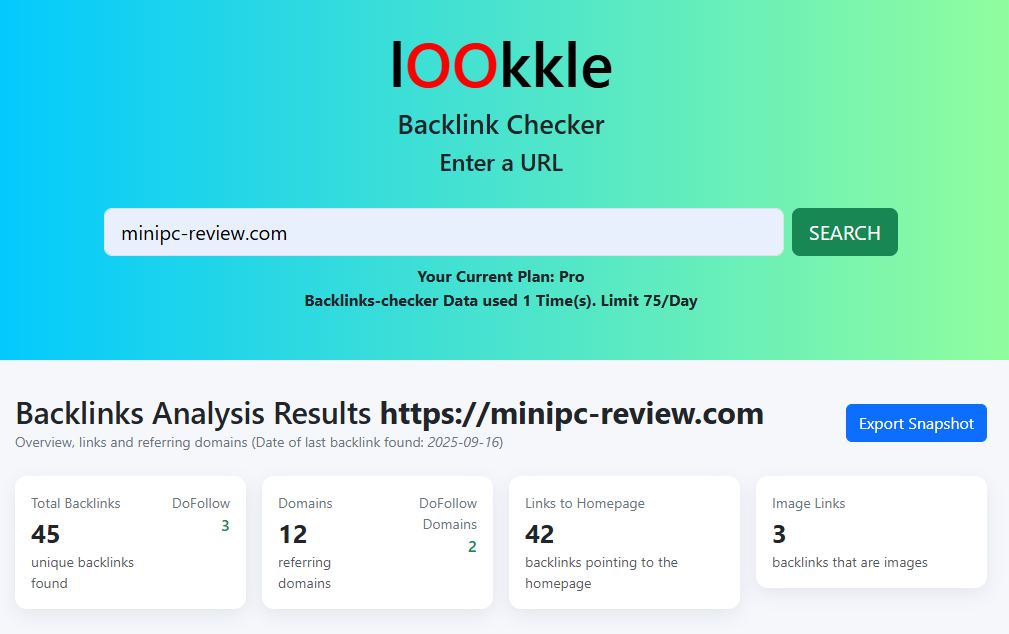
Once you hit Analyze, expect to see:
-
Quick overview (dashboard): total backlinks, referring domains, DoFollow vs NoFollow, broken links.
-
Check immediately: if total numbers are suspiciously low, confirm you used the correct URL and that your site doesn’t block crawlers.
-
-
Backlink list: Top links sorted by review date.
-
Check immediately: identify high-authority backlinks relevant to your niche by looking at the title and anchor text.
-
-
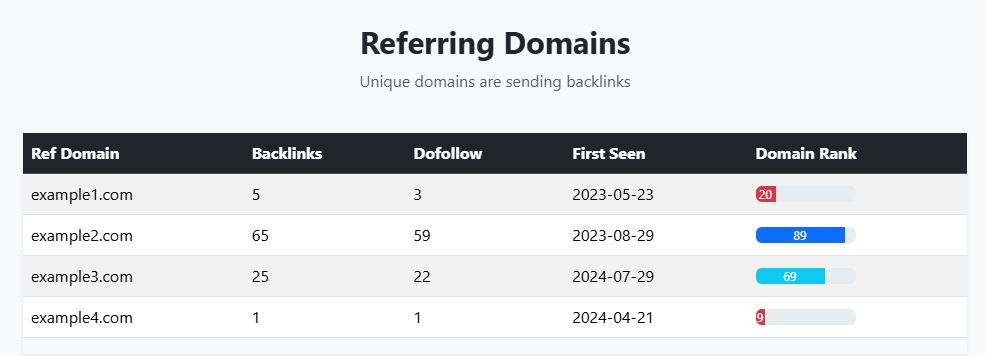
Referring domains list: domains sorted by authority or backlink review date.
-
Check immediately: spot high-authority, niche-relevant domains — early outreach targets.
-
-
Toxic/risk signals: domains flagged as spammy or irrelevant.
-
Check immediately: domains marked as zero or zero link rank.
-
-
Backlink status: broken links.
-
Check immediately: broken or redirected links pointing to old pages.
-
1.5. First filters & quick insights
Apply filters right away to prioritize analysis:
-
By authority (Domain Authority > X) → focus on strong links first.
-
By link type (DoFollow only) → isolate links that pass Link Rank.
-
By date (First Seen / Last Seen) → detect new or lost links.
-
By Broken status (404 error) → identify broken backlinks you can reclaim.
1.6. Export results — why you should do this immediately
Always export the results before digging deeper:
-
CSV → best for spreadsheets (filter, pivot, group).
-
XLSX → for sharing with teams or clients.
-
PDF → for executive summaries.
Pro tip: export two sets:
-
Full backlink list.
-
Toxic/broken links only — for quick fixes.
1.7. Immediate verification checklist
With the data in hand, quickly check:
-
Do the top referring domains match expectations? If not, investigate gaps.
-
Too many low-quality / irrelevant language links? Could signal spam attacks.
-
Important backlinks pointing to 404 pages or error pages? High-priority recovery task.
-
Patterns of bought/spammy links (identical anchors, irrelevant sources)? May require disavow.
-
Valuable backlinks pointing to wrong URLs (outdated pages, homepage instead of deep links)? Fix via 301s or outreach.
1.8. Turning data into quick actions
Once the initial review is complete, move into action mode:
-
Outreach prioritization: extract the top 20 high-authority competitor backlinks and plan outreach.
-
Broken link recovery: identify broken links and either restore content or redirect.
-
Toxic link disavow: prepare a
.txtdisavow file for Google Search Console. -
Team tasks: share filtered lists (e.g., Outreach / Fix 404 / Disavow) with owners and deadlines.
1.9. Common mistakes when entering URLs (and fixes)
-
Incomplete results → check robots.txt or firewall/CDN settings (Cloudflare, Sucuri).
-
Fewer backlinks vs. other tools → databases vary; cross-check with multiple tools.
-
Duplicate backlinks (www vs non-www, trailing slash) → normalize URLs before analysis.
-
URLs with query strings → can inflate duplicates (
?ref=abc). Group by base URL.
Step 2: Analyze the Quality of Your Backlinks (Comprehensive Guide)
Once you’ve entered your URL and generated the initial backlink report, the next step is not just counting backlinks but understanding their quality. A single strong backlink from an authoritative, relevant site can be more valuable than dozens of weak or spammy ones. That’s why backlink analysis is all about quality, not just quantity.
Below, we’ll break down what “quality” really means, the metrics you should look at, and how to interpret the results inside Lookkle’s Backlink Checker.
2.1. What defines a “quality” backlink?
A high-quality backlink usually checks most of these boxes:
-
Relevance — The linking site covers topics related to yours.
-
Example: if your site is about mini PCs, a backlink from a tech blog is far stronger than one from a random gardening forum.
-
-
Authority & trust — The linking domain has a strong reputation, high domain authority, and is trusted by Google.
-
Links from news sites, educational domains (
.edu), or government pages (.gov) carry significant weight.
-
-
DoFollow vs NoFollow — DoFollow backlinks pass PageRank (SEO value), while NoFollow links don’t directly boost rankings but still drive traffic and brand visibility.
-
A healthy profile usually includes both types, but DoFollow links are the most critical for SEO growth.
-
-
Placement & context — Backlinks placed naturally inside relevant content are far more valuable than footer or sidebar links.
-
Example: a link embedded in a product review paragraph is stronger than one hidden in a “links” page.
-
-
Anchor text quality — The clickable text should look natural and relevant.
-
Over-optimized anchors (e.g., “cheap mini PCs buy now”) can look spammy, while branded or descriptive anchors are safer.
-
-
Traffic potential — A backlink from a site with real traffic can send visitors to your page, providing direct value beyond rankings.
-
Clean link profile of the referrer — If the linking site itself has spammy outbound links, its backlink is less valuable and could even be risky.
2.2. Key metrics to evaluate inside Lookkle Backlink Checker
When analyzing your report, pay attention to these indicators:
-
Referring domain authority ranking → shows how strong the linking domain is compared to others.
-
Link type (DoFollow/NoFollow) → helps prioritize which links pass SEO value.
-
Anchor text distribution → reveals whether your profile looks natural or is over-optimized. Sort them in the table alphabetically and detect suspicious anchor text.
-
First Seen / Last Seen dates → track when backlinks first appeared and whether they’re still active.
-
Spam/Toxicity signals → flags domains that may harm your SEO if left unchecked.
-
Traffic estimate of linking site → shows whether the backlink can bring referral visitors.
2.3. How to spot good vs bad backlinks
| Factor | High-Quality Backlink | Low-Quality / Toxic Backlink |
|---|---|---|
| Relevance | Tech blog linking to your software site | Casino site linking to your health blog |
| Authority | Link from Forbes or Wired | Link from a brand-new site with no history |
| Anchor Text | “Guide to mini PCs” | “CLICK HERE!!!” or keyword-stuffed anchors |
| Traffic | Site with 50k+ monthly visitors | Site with no measurable organic traffic |
| Placement | In-article contextual link | Hidden in footer, sidebar, or comment spam |
| Link Profile | Site links out to reputable brands | Site links out to hundreds of unrelated domains |
2.4. Common backlink risks (what to watch out for)
-
Link farms & PBNs (Private Blog Networks): groups of sites created only to sell backlinks.
-
Irrelevant backlinks: sites with no thematic connection. Too many can dilute your authority.
-
Foreign language spam: sites in unrelated languages often indicate automated linking.
-
Sitewide links: backlinks appearing in every page (e.g., footer links) look unnatural.
-
Exact-match anchor overuse: too many identical keyword anchors may trigger Google’s Penguin algorithm filters.
2.5. Practical steps inside Lookkle
When you open your backlink report in Lookkle, here’s how to proceed:
-
Sort by Domain Rank
-
Identify your strongest referring domains. These are the “crown jewels” of your profile.
-
-
Filter by DoFollow only
-
Quickly see how many links actually pass SEO value.
-
-
Group by Referring Domains
-
Check diversity: 100 backlinks from 1 domain are less valuable than 100 backlinks from 100 domains.
-
-
Review Anchor Texts
-
Ensure anchors look natural. If you see too many identical keyword-heavy anchors, take note.
-
-
Check for Toxic Domains
-
Lookkle flags risky sites. Pay special attention to whether the site you're linking from is a link farm. These types of links are easy to identify because they usually have the symbols ? or = in the URL. A good link always comes from a URL that contains a phrase where the words are separated by hyphens.
-
-
Identify Lost Backlinks
-
Use the “Last Seen” column to spot links that have disappeared. Consider outreach to reclaim them. You can see them in the Lost Link column marked with a red circle.
-
2.6. Turning analysis into actions
-
Strengthen relationships with strong domains → If a high-authority blog already links to you, reach out for further collaborations (guest posts, case studies).
-
Recover broken or lost backlinks → Contact site owners to fix outdated links or restore removed references.
-
Diversify anchors → Adjust your link-building strategy to include branded and natural anchors.
-
Clean up toxic links → Use Google’s Disavow Tool if necessary to protect your rankings.
-
Benchmark competitors → Compare their top referring domains and see if you can earn similar links.
Step 3: Analyze Your Competition
Understanding your competitors’ backlink profiles is one of the most powerful strategies in SEO. By studying where their links come from, what types of content attract those links, and which partnerships they’ve built, you can reverse-engineer their success and apply similar tactics to your own site.
Think of this as “ethical spying”: you’re not copying blindly, but learning what works in your niche and using it to refine your link-building strategy.
3.1. Why competitor backlink analysis matters
-
Shortcut to link opportunities
-
Instead of guessing where to get backlinks, you instantly see which sites are already linking to competitors. These are warm prospects who may also link to you.
-
-
Benchmarking authority
-
Knowing how many quality backlinks competitors have helps you set realistic goals. If your closest rival has 500 strong backlinks, you can estimate how many you’ll need to compete.
-
-
Content strategy insights
-
Which competitor pages attract the most backlinks? Product reviews? Tutorials? Infographics? This reveals what kind of content works in your industry.
-
-
Identifying gaps
-
Sometimes you’ll discover domains linking to all your competitors except you. That’s a golden opportunity.
-
-
Protecting your rankings
-
If competitors suddenly gain a surge of new backlinks, you’ll notice it early and can respond by strengthening your own strategy.
-
3.2. Setting up competitor analysis in Lookkle
-
Enter competitor domains
-
In Lookkle Backlink Checker, you can input not only your own domain but also your competitors’. Start with your top 3–5 rivals (direct and indirect).
-
-
Run side-by-side comparison
-
Lookkle generates reports showing:
-
Total backlinks & referring domains
-
DoFollow vs NoFollow ratios
-
Domain authority distribution
-
Anchor text patterns
-
Toxic/spammy links
-
-
-
Identify overlapping links
-
Lookkle highlights “common backlinks” (domains linking to multiple competitors). If they link to several in your niche, chances are they’ll link to you too.
-
-
Spot unique backlinks
-
Lookkle also flags backlinks that only one competitor has. These are usually special partnerships, PR mentions, or guest posts you might replicate.
-
3.3. Metrics to focus on when studying competitors
-
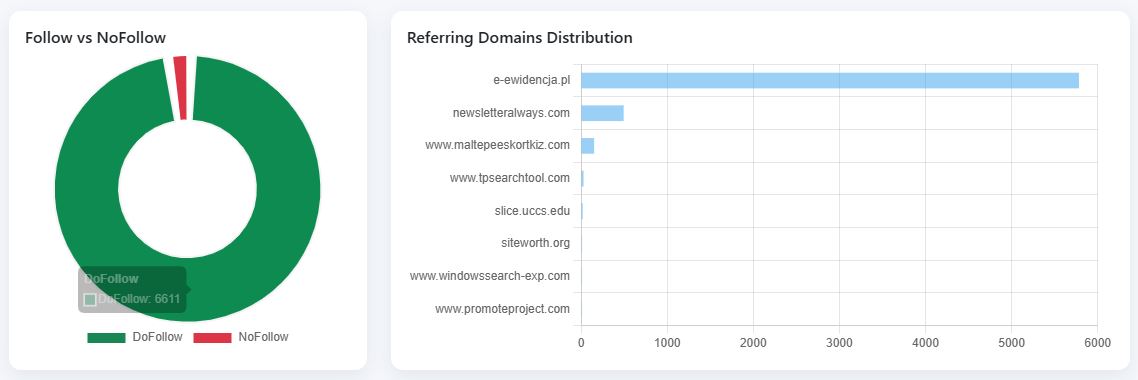
Number of referring domains
→ More important than total backlinks; diversity shows stronger authority.
-
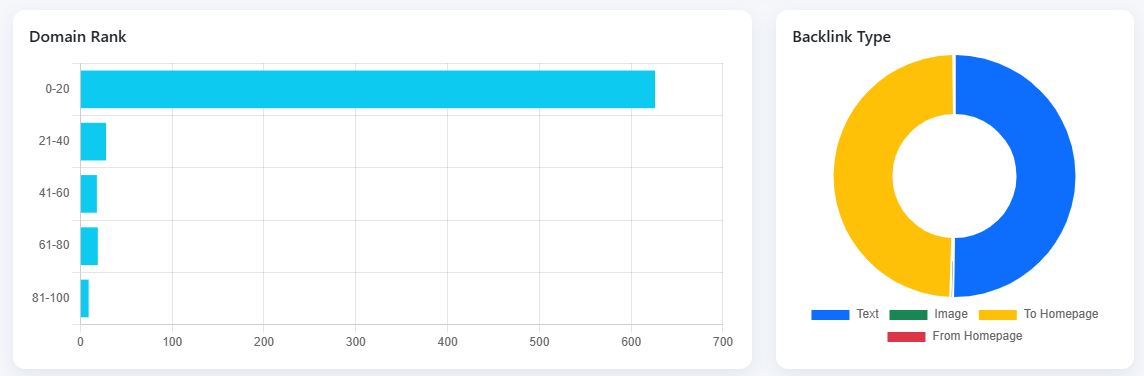
Ranking of linking domains
→ A few high-quality backlinks can explain why a competitor ranks above you.
-
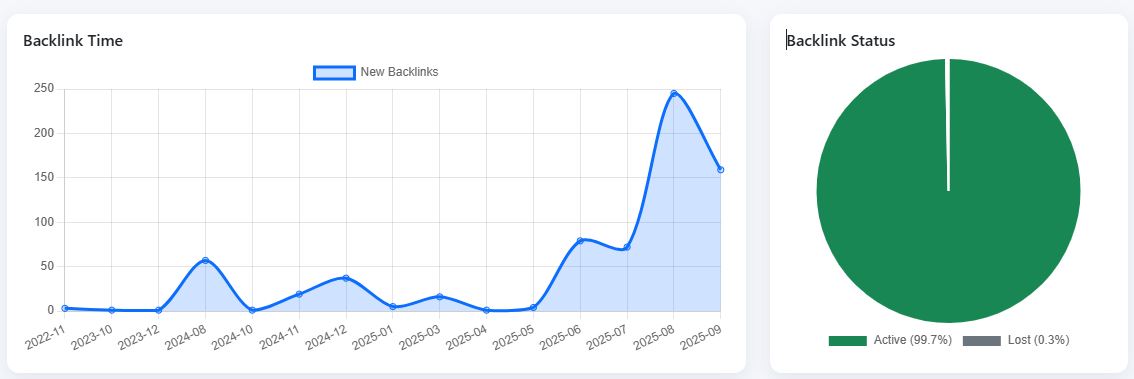
Link velocity (growth over time)
→ Are they gaining backlinks faster than you? If yes, you may need to accelerate your outreach.
-
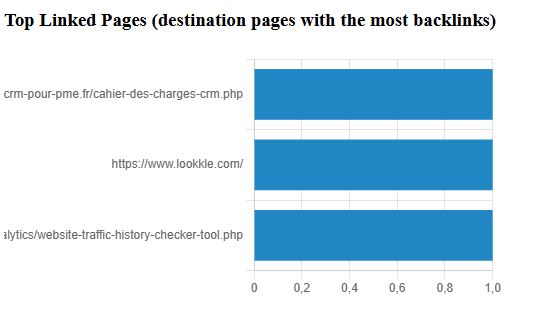
Top linked pages
→ Which of their URLs attract the most backlinks? (E.g., guides, case studies, research reports, tools.)
-
Anchor text distribution
→ Do they rely on branded anchors, keyword-rich anchors, or natural phrases? This shows their link-building style. -
Geographic/language focus
→ Are competitors earning links mostly from English sites? Local sites? Industry-specific blogs? This reveals their target outreach.
3.4. Practical strategies after analyzing competitors
-
Replicate successful backlinks
-
Reach out to websites that already link to competitors and pitch your content as an additional or better resource.
-
-
Outperform their content (the “Skyscraper Technique”)
-
If competitors earned links from a “Top 10 Mini PCs of 2025” article, create a more comprehensive “Top 20” version with better visuals and updated specs.
-
-
Target missed opportunities
-
Lookkle shows domains linking to competitors but not to you. These are your low-hanging fruit — prioritize outreach here.
-
-
Leverage PR & mentions
-
If competitors gained links from industry news sites, prepare press releases or pitch stories to those same outlets.
-
-
Find weak spots
-
Identify low-quality or toxic links pointing to competitors. If they rely heavily on spammy link farms, you know they’re vulnerable to penalties — and you can gain a long-term advantage with a cleaner strategy.
-
3.5. Example workflow inside Lookkle
-
Enter your domain → generate backlink report.
-
Enter Competitor A → generate report.
-
Export competitor backlinks (CSV).
-
Create a link gap list → domains linking to them but not you.
-
Prioritize outreach → start with high-authority domains from that gap list.
Step 4: Plan Your Backlink Strategy
Once you understand who links to you, who links to your competitors, and which backlinks have the most value, the next step is turning these insights into a step-by-step backlink acquisition plan.
This isn’t about getting as many links as possible, it’s about getting the right links that build authority, trust, and relevance for your site.
4.1. Why planning matters
-
Avoid randomness → Without a plan, you risk chasing low-quality links that bring little or no SEO value.
-
Prioritize efforts → Some backlink opportunities are “low-hanging fruit,” while others require longer outreach. A strategy helps you allocate time effectively.
-
Balance link profile → Google values natural diversity (blogs, news, forums, guest posts). Planning ensures your backlinks look authentic.
-
Stay consistent → Link building is not a one-time task. A clear plan allows you to build gradually, avoiding suspicious spikes.
4.2. Elements of a strong backlink strategy
-
Define your goals
-
Do you want to rank higher for a specific keyword?
-
Do you want more referral traffic from niche blogs?
-
Do you want to boost your brand authority in your industry?
Your goal determines the type of backlinks you need.
-
-
Segment backlink opportunities
Use your Lookkle reports to categorize:-
Quick wins → Directories, mentions, broken link replacements.
-
Medium-term → Guest posts, collaborations, content swaps.
-
Long-term → High-authority media features, research-based content, partnerships.
-
-
Target by quality, not just quantity
Lookkle helps identify high-authority domains. Getting one link from a respected industry magazine may be more powerful than 50 low-quality links. -
Content-driven link building
Plan to create content worth linking to, such as:-
Research studies
-
“Ultimate guides” or tutorials
-
Tools and calculators
-
Infographics and data visualizations
Competitors’ top-linked pages (found in Step 3) will guide you on what type of content works best.
-
-
Anchor text planning
Decide in advance how you want your brand or keywords represented:-
Branded anchors: “Lookkle”
-
Keyword anchors: “backlink checker tool”
-
Generic anchors: “click here,” “this website”
A natural mix is key to avoiding over-optimization.
-
-
Outreach calendar
Build a monthly link-building calendar, where you assign actions like:-
Week 1: Outreach to blogs for guest posting
-
Week 2: Contact sites linking to competitors but not you
-
Week 3: Identify broken backlinks and pitch your resources
-
Week 4: Publish link-worthy content on your own site
-
4.3. Practical tactics to include in your plan
-
Guest posting → Write valuable content for other blogs in exchange for a backlink.
-
Broken link building → Use Lookkle to find backlinks pointing to dead competitor pages, then suggest your content as a replacement.
-
Unlinked brand mentions → Track mentions of your brand online and request that they be converted into backlinks.
-
Resource pages → Contact websites with “Resources” or “Tools” sections and ask to be listed.
-
Digital PR → Issue press releases when you launch features, research, or industry reports.
-
Skyscraper technique → Create content that improves on competitors’ most linked pages and promote it to the same audiences.
4.4. Timeline & monitoring
A realistic plan looks something like this:
-
Month 1 → Audit current backlinks, identify gaps, list 50 target domains.
-
Month 2 → Launch guest posting and outreach campaigns.
-
Month 3 → Create new link-worthy content (e.g., case study, report).
-
Month 4 → Follow up on outreach, build partnerships, track link growth in Lookkle.
-
Ongoing → Monitor new backlinks and competitor activity monthly.
4.5. Example workflow
-
Use Lookkle to export competitor backlink data.
-
Build a link gap list → domains linking to competitors but not you.
-
Prioritize high-authority, niche-relevant sites.
-
Assign outreach tasks → email templates, follow-ups.
-
Track progress → check every 30 days in Lookkle to see what’s working.
Step 5: Monitor Your Progress
Backlinks are not static. Some links will disappear, others will lose value, and new competitors will keep gaining fresh backlinks. That’s why continuously monitoring your progress with Lookkle Backlink Checker is just as important as building the links in the first place.
Monitoring ensures that your efforts are paying off and that you can quickly react to both opportunities and risks.
5.1. Why monitoring backlinks matters
-
Links can vanish
-
Websites update content, change URLs, or shut down. A link that boosted your authority last month might be gone today.
-
-
Quality changes over time
-
A site that was trustworthy when it linked to you may later drop in quality or become spammy, which could hurt your rankings.
-
-
Competitor activity never stops
-
Competitors are constantly acquiring new backlinks. Without tracking, you risk falling behind.
-
-
Detecting Google risks
-
Toxic or spammy backlinks can appear without your involvement (negative SEO attacks). Monitoring helps you catch them early and disavow them if needed.
-
-
Measuring ROI
-
Link-building takes time, effort, and often money. Monitoring allows you to measure which tactics are delivering the best results.
-
5.2. What to monitor with Lookkle
-
Total backlinks and referring domains
-
Are you gaining more quality domains over time, or is growth stagnant?
-
-
Authority trends
-
Are the new backlinks coming from high-authority sources or low-value sites?
-
-
DoFollow vs NoFollow ratio
-
A healthy link profile includes both, but too many NoFollow links may limit your SEO impact.
-
-
Anchor text evolution
-
Are anchors natural and varied, or overly optimized? Sudden spikes in exact-match anchors can trigger penalties.
-
-
Lost backlinks
-
Lookkle shows which links have disappeared. You can reach out to recover them or replace them with new opportunities.
-
-
Toxic backlinks
-
Monitor for suspicious links from link farms, irrelevant forums, or penalized sites.
-
-
Competitor link velocity
-
How fast are competitors gaining backlinks compared to you? This indicates whether your outreach pace is competitive.
-
5.3. Tools inside Lookkle that help
-
Historical backlink graphs → visualize your link growth month by month.
-
Alerts/notifications → get notified when you gain or lose a backlink.
-
Toxic link detector → automatic flags for harmful backlinks.
-
Comparison reports → track whether you’re catching up to competitors.
5.4. Setting up a monitoring schedule
-
Weekly checks → Review new/lost backlinks, toxic links.
-
Monthly reports → Export backlink growth data, compare with competitors, measure link-building campaign ROI.
-
Quarterly strategy review → Assess whether you need to adjust outreach tactics or content creation efforts.
5.5. How to act on monitoring insights
-
Recover lost links
-
If a site removed your backlink, politely reach out and ask if they can reinstate it.
-
-
Disavow harmful links
-
For toxic backlinks, use Google’s Disavow Tool to protect your domain.
-
-
Double down on what works
-
If a certain type of content (e.g., case studies) consistently attracts backlinks, create more of it.
-
-
Adapt to competitor growth
-
If competitors are accelerating their backlink acquisition, intensify your outreach to stay competitive.
-
5.6. Example workflow
-
Run Lookkle Backlink Checker weekly → log new and lost backlinks.
-
Tag backlinks by quality (high, medium, low).
-
Export competitor backlink data monthly → identify fresh opportunities.
-
Update your link-building calendar based on monitoring insights.
-
Prepare quarterly reports for stakeholders or your SEO team to show growth and ROI.
Benefits of Using Lookkle Backlink Checker
The Lookkle Backlink Checker is not just another backlink analysis tool. It’s designed to give marketers, SEOs, and business owners a clear, actionable view of their link profile and competitive landscape.
Here’s a detailed breakdown of the key benefits:
1. Complete Backlink Visibility
-
Get an instant overview of all domains and pages linking to your website.
-
See both DoFollow and NoFollow links so you know exactly which ones impact your rankings.
-
Identify the source, context, and anchor text of each backlink, giving you transparency instead of guesswork.
Why it matters: Backlinks are one of Google’s strongest ranking signals. Without visibility, you’re flying blind in SEO.
2. Quality Over Quantity Analysis
-
Not all backlinks are created equal. Lookkle highlights high-authority vs low-quality links.
-
Detect toxic backlinks from spammy sites before they harm your SEO.
-
Focus your efforts on reliable, niche-relevant domains that move the ranking needle.
Why it matters: A single strong backlink can outperform 100 weak ones. Knowing which links truly count saves time and resources.
3. Competitor Insights at Your Fingertips
-
Analyze any competitor’s backlink profile to see where their authority comes from.
-
Identify shared backlinks (sites linking to multiple competitors) and unique backlinks (opportunities you’re missing).
-
Compare link-building velocity to measure whether you’re catching up or falling behind.
Why it matters: SEO is relative. If your competitors are earning better links, they’ll outrank you. Competitor analysis turns backlink building into a data-driven strategy.
4. Discover New Link-Building Opportunities
-
Use Lookkle to find domains linking to your competitors but not to you.
-
Spot content types that consistently attract backlinks (guides, case studies, tools, infographics).
-
Build a target list of websites most likely to link to you, based on proven behavior.
Why it matters: Link-building is one of the hardest parts of SEO. With Lookkle, you don’t start from zero—you build on existing opportunities.
5. Ongoing Backlink Monitoring
-
Get notified when you gain or lose backlinks.
-
Track the health of your link profile over time with historical graphs.
-
Detect sudden spikes in spammy backlinks that could signal a negative SEO attack.
Why it matters: SEO isn’t a one-time project. Ongoing monitoring ensures you protect your progress and sustain growth.
6. Improved SEO Performance
-
A well-optimized backlink profile increases domain authority and keyword rankings.
-
Strong backlinks also bring referral traffic from relevant audiences.
-
More authority = faster indexing of new content and better chances of ranking for competitive keywords.
Why it matters: At the end of the day, backlinks aren’t just about SEO—they’re about visibility, traffic, and conversions.
7. Easy-to-Use Interface
-
Unlike some heavy SEO platforms, Lookkle is streamlined and intuitive.
-
No steep learning curve—perfect for beginners, yet detailed enough for advanced SEOs.
-
Generate reports in minutes without wasting time on unnecessary features.
Why it matters: Tools should empower you, not overwhelm you. Lookkle makes backlink analysis accessible for everyone.
8. Cost-Effective SEO Solution
-
Competing platforms (Ahrefs, SEMrush, Moz) can be expensive.
-
Lookkle offers essential backlink features at a fraction of the cost, making it ideal for startups, freelancers, and small businesses.
Why it matters: You don’t need enterprise budgets to run professional SEO campaigns.