lOOkkle

lOOkkle Free Backlink Checker

Discover Backlinks and General Statistics of a Website

Backlink Overview

Quick snapshot of your backlink profile

Total Backlinks

6,737

All links pointing to your site

DoFollow

6,611

Links passing SEO value

Referring Domains

146

Unique domains linking to you

DoFollow Domains

88

Domains with valuable links

Homepage Links

6,549

Links pointing to your homepage

Image Links

3

Links coming from images

This section provides a quick snapshot of your backlink profile, helping you understand the overall strength and diversity of your links. It highlights how many backlinks you have, how many pass SEO value (DoFollow), and how many domains are linking to your site. Homepage and image links are tracked separately since they play different roles in authority building and visibility.

All Backlinks

Detailed list of backlinks pointing to your website

From URL To URL Title Anchor Alt Rel Image Lost Link Link Rank Domain Rank First Seen Last Visited
https://minipc-review.com https://www.lookkle.com/web-analytics/web-organic-traffic-checker-free.php?website=https://crm-pour-pme.fr/cahier-des-charges-crm.php Informations logiciel CRM LOOkkle - dofollow   Active
29
78
2025-05-23 2025-08-16
https://newsletteralways.com/tips-for-creating-compelling-product-descriptions https://www.lookkle.com/ Tips for Creating Compelling Product Descriptions lOOkkle.com - dofollow   Active -
5
2025-08-22 2025-08-22
https://www.maltepeeskortkiz.com/the-brutalist-review-trailer/ https://www.lookkle.com/ The Brutalist Review and Trailer - Movies & Games Powered by lOOkkle.com - nofollow   Active -
9
2025-08-23 2025-08-23
https://example.com/blog/post1 https://www.lookkle.com/ SEO Services best seo tools - dofollow   Active
9
90
2023/05/12 2025/08/01
https://othersite.org/page.html https://www.lookkle.com Blog Article seo backlink checker SEO graphic nofollow ✔️   Active
45
60
2022/10/20 2025/07/25
https://partner.net/resources https://www.lookkle.com/ Homepage lookkle backlink checker - nofollow   Lost
20
30
2024/01/14 2025/07/25

This table gives you detailed information about every backlink pointing to your website. You can identify where the link is coming from, its anchor text, whether it’s an image, and its SEO quality (via Link Rank & Domain Rank). Tracking the "First Seen" and "Last Visited" dates lets you monitor new backlinks and detect potentially lost ones.

Referring Domains

Unique domains are sending backlinks

Ref Domain Backlinks Dofollow First Seen Domain Rank
example1.com 5 3 2023-05-23
20
example2.com 65 59 2023-08-29
89
example3.com 25 22 2024-07-29
69
example4.com 1 1 2024-04-21
9

This section shows which unique domains are sending backlinks to your site. It helps you assess the quality and authority of referring domains, track the history of when the domain first linked to you, and check how many of those links are DoFollow. A higher number of unique referring domains usually indicates a stronger, more natural backlink profile.

Anchor and Link Types

Link relevance and Stability

Text Anchors

6,667

count of different anchors detected

Homepage Links

17

Links from homepage & DoFollow

Lost / Removed Links

2

Estimated removed Backlinks

This data helps you evaluate link relevance and stability. Text anchor diversity is important for avoiding over-optimization penalties. Homepage links indicate brand-strengthening backlinks. Lost or removed links show you where you may be losing authority and need recovery actions.

Link Type Distribution

Visual breakdown of Link Types and Sources

Follow vs NoFollow

Referring Domains Distribution
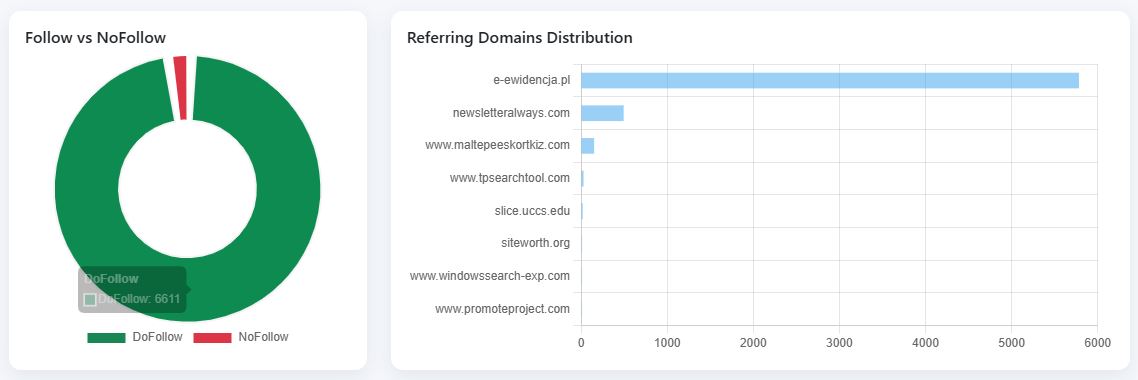
Chart showing the top domains with backlinks relative to the number of backlinks each domain has and doFollow Vs noFollow

Charts in this section give you a visual breakdown of link types and sources. You can instantly see how balanced your DoFollow vs NoFollow links are, and whether your backlinks are concentrated on a few domains or distributed across many, a key factor in search engine trust.
Backlink Performance

How your Backlinks are Performing Over Time

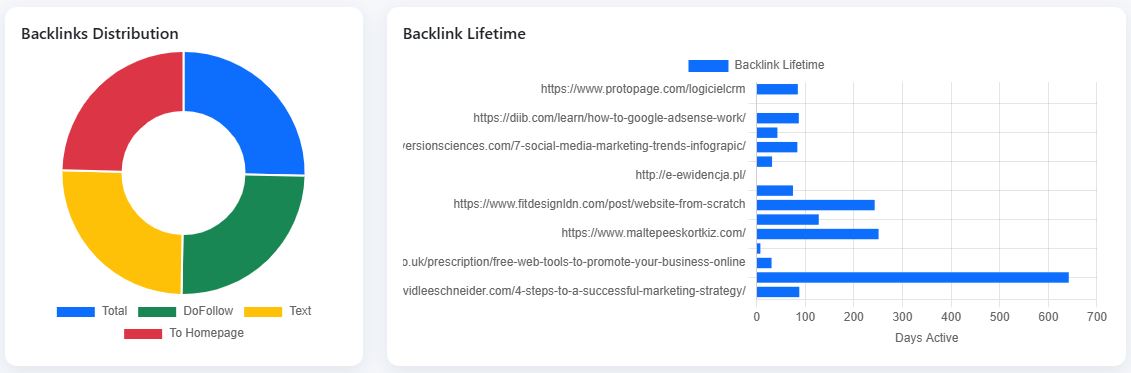
Backlinks Distribution

How links spread across pages

Backlink Lifetime

How long links have stayed active

Chart showing the backlink duration for each web page and percentage distribution of backlinks

This section highlights how your backlinks are performing over time. A wide distribution across multiple pages is a positive ranking signal, while monitoring backlink lifetime helps you detect patterns of lost or short-lived links that may need replacement.

Authority and Link Types

Quality of your backlink sources

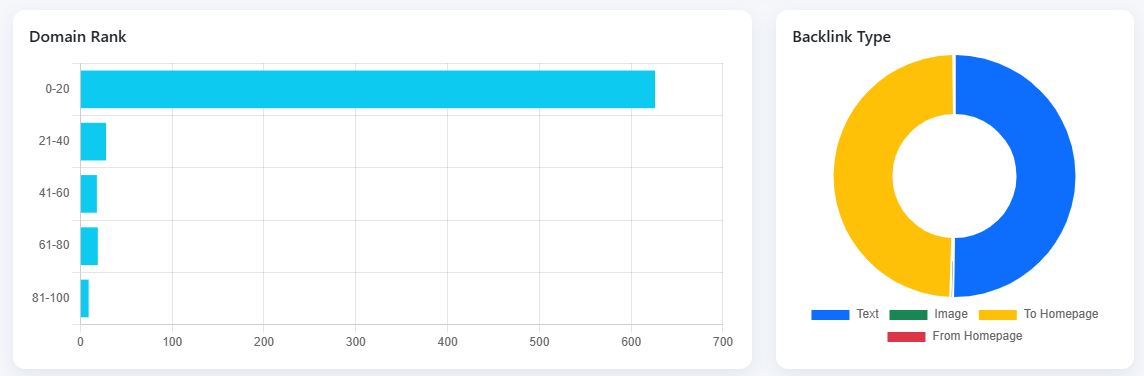
Domain Rank

Distribution of domain authority from 0-100

Backlink Type

Text, image, homepage, etc.

Distribution of the number of domains according to the ranking and distribution of the type of backlinks the website receives

These insights show the quality of your backlink sources. A higher domain rank distribution means your site is getting links from authoritative domains. The backlink type chart helps you check whether your profile is text-heavy or supported by image and homepage links, ensuring a balanced strategy.

Timing and Status

How your backlinks are performing over time

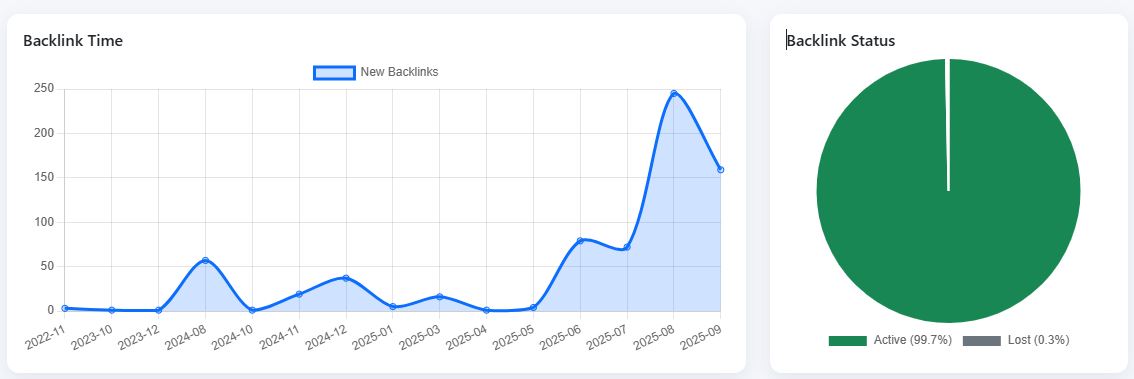
Backlink Time

Evolution and Stability of your backlinks

Backlink Status

Active vs Lost

Chart showing the evolution of the number of backlinks over time and the following chart showing the comparison between backlinks that remain active and backlinks that have been lost

This section highlights how your backlinks are performing over time. A wide distribution across multiple pages is a positive ranking signal, while monitoring backlink lifetime helps you detect patterns of lost or short-lived links that may need replacement.

📌 Frequently Asked Questions (FAQ) - lOOkkle Backlink Checker

🔹 General Questions About Backlinks

A backlink is a hyperlink from another website pointing to yours. Backlinks are important because they act as “votes of trust” for your site in Google’s eyes, improving visibility, authority, and rankings.

A Backlink Checker is an essential tool for any SEO strategy. It allows you to analyze the links pointing to your website, which is crucial for evaluating the quality of your backlink profile.

A healthy and high-quality backlink profile is key to maintaining or improving your rankings on search engines like Google.

Our free backlink checker allows you to get a clear overview of all the backlinks that influence a website's SEO, i.e. the most important backlinks for that site, but with limited and complete daily use.

Lookkle.com offers a free backlink checker that provides a comprehensive analysis of your backlinks, helping you improve your SEO strategy without any upfront costs. With our tool, you can identify strengths and weaknesses in your backlink profile to optimize your link-building efforts.

  • DoFollow backlinks pass SEO value and authority from the source site to your site.
  • NoFollow backlinks do not transfer SEO authority but can still bring traffic and brand visibility.

Referring domains are the number of unique websites linking back to you. Multiple backlinks from the same website count as one referring domain.

High-quality backlinks from authoritative, relevant websites can significantly improve your rankings. Low-quality or spammy backlinks can hurt your SEO.

  • Link Rank measures the strength of an individual backlink (0-100).
  • Domain Rank measures the authority of the entire referring domain (0-100).

    Link building is an SEO (web positioning) strategy that involves obtaining links from other websites to yours.
    These links are called backlinks and function as "votes of confidence":
  • If a relevant and trustworthy website links to your page, search engines (like Google) interpret your content as useful and valuable.
  • The more quality links your site has, the more authority it will gain and the more likely you are to appear in the top search results.

  • Quality over quantity: It's better to have a few links from relevant websites than many links from untrustworthy sites.
  • Naturalness: Google or Bing penalizes artificial practices (mass link buying, link farms, spam).
  • Diversity: Obtain links from different types of pages and formats (blogs, news outlets, directories, social networks, etc.).
  • Valuable content: The best link magnet is to publish useful, original, and shareable content.

  • Get mentions on blogs or in the media.
  • Guest post (write articles as a guest on another site).
  • Create infographics, studies, or guides that others want to link to.
  • Participate in forums, directories, or specialized communities (without spamming).

  • A quality backlink tells Google that your content is valuable.
  • The more relevant links you have (from trusted, authoritative sites), the greater the likelihood of ranking high.
  • More important are links from quality sites on the same topic as the targeted site.
  • An important site for Google is a site that appears at the top of its search engine.

No. Google takes into account many more links than you see in that list. That's why backlink analysis tools like Lookkle are important.

Yes, backlinks are also important in Bing, although not exactly the same as in Google:
  • Bing gives more weight to on-page factors (optimized content, tags, site structure) than Google.
  • Bing even highly values links from official, educational, or trusted sites (.edu, .gov, large media).

  • These AIs don't use backlinks as a ranking signal because they aren't traditional search engines.
  • If your website gains authority and visibility thanks to backlinks, it will appear better on Google/Bing.
  • By ranking higher, your content is more likely to be crawled, indexed, and referenced in AI datasets or real-time searches.

Yes, a backlink tool can help you grow your website, not because it generates links on its own, but because it gives you strategic information so you can build a smart link building strategy.
Analyze your competitors:
  • See where they get their links from.
  • Detect patterns (blogs, media, forums, directories, collaborations).
  • Get inspired to replicate or surpass their strategy.
Audit your own backlinks:
  • Review what links you currently have.
  • Identify if there are toxic links that could affect your SEO.
  • Measure quality (domain authority, topical relevance).
Discover backlink opportunities:
  • Find sites that already link to your competitors but not to you.
  • Look for broken links (broken link building) that you could replace with your content.
  • Detect mentions of your brand without a link and request that it be added.

🔹 About Tool Metrics

Lookkle Backlink Checker displays a main table where you can see the main backlinks pointing to a website. Its main features are:
  • URL FROM & URL TO: Gain insights into the origin and destination of your links, helping you better understand your backlink network.
  • Anchor: Review the anchor text used in backlinks, ensuring proper keyword optimization.
  • Title: Its main function is to display a tooltip when the user hovers over the link.
  • ALT: It's used in image links to describe the content of an image. It helps search engines understand the image's content.
  • Rel: Dofollow or Nofollow: Identify whether your backlinks are dofollow (passing SEO authority) or nofollow (not passing SEO authority), which directly impacts your SEO performance.
  • Image: Someone posts an image on their website and that image includes a link to your page.
  • Lost Link: This is a backlink that previously existed pointing to your website, but is no longer available.
  • Link Rank: This is a metric that attempts to measure the strength or authority of an individual link based on various SEO factors. Its scale ranges from 0 to 100, where 100 represents the strongest and most valuable link.
  • Domain Rank: Evaluate the authority of the domain linking to your site. Higher Domain Rank means greater SEO impact from that backlink.
  • First Seen: This is the first time the tool detected the existence of the backlink on the source website.
    It indicates the age of the link, which helps determine whether a backlink is new or has been providing authority for years.
  • Last Visited: This is the last time the tool crawled and confirmed that the backlink still exists on the source page.
    It is updated each time the crawler revisits the link.
  • Review Date: Keep track of your backlinks with review dates to ensure your link profile stays up-to-date.

  • First Seen: the date when Lookkle first detected the backlink.
  • Last Visited the most recent date Lookkle confirmed the backlink is still active.

If the Last Visited date is old and the link is no longer detected on the referring page, the backlink is marked as “Lost” in Lookkle.

Text anchors are the clickable text used in backlinks. They're relevant because they show how other websites describe your brand or content. Over-optimized anchors may signal spam to search engines.

Backlinks from a homepage are generally more powerful because they’re placed on a highly authoritative page, usually with high visibility.

  • Follow vs NoFollow: helps you understand how many backlinks pass SEO authority.
  • Domain Rank distribution: shows how strong or weak your referring domains are, based on their authority.

An image backlink is created when another site links to your website through an image. These can also pass authority if DoFollow.

Because the specific page linking to you may have low authority, too many outbound links, or weak contextual relevance, reducing the individual backlink’s value.

Homepage links are links that come directly from a website's main page (homepage) to another website or external domain.
In the SEO world, this type of link is considered especially valuable because the homepage typically has the greatest amount of authority ("link juice") and is most frequently crawled by search engines.

🔹 Technical / Business

Lookkle focuses on clarity, lightweight reporting, and affordability while still providing essential backlink data such as Link Rank, Domain Rank, and Lost Links without overwhelming users with unnecessary complexity.

Lookkle combines its own crawling technology with reliable third-party data sources to ensure accurate backlink tracking.

Domain Rank in Lookkle is a proprietary score (0–100) similar to DA/PA, based on link quality, domain authority, and trust signals. It is not identical but serves the same purpose of measuring domain strength.

Backlink databases are massive, and no tool can detect 100% of links. Lookkle continuously updates and expands its index to improve coverage.

🔹 Practical Use of Lookkle

Lookkle frequently crawls and updates data to keep results fresh. Updates depend on crawl cycles, usually ranging from days to weeks.

Yes, Lookkle allows you to export all backlinks and referring domains into CSV or Excel for further analysis.

Yes. Suspicious or spammy backlinks can be identified by low Link Rank, irrelevant anchors, or domains with very low Domain Rank.

Yes, the Lookkle Backlink Checker provides filters by link type (DoFollow/NoFollow, image/text), authority metrics, and detection date.

Yes, you can see both active and lost (removed) backlinks through First Seen and Last Visited metrics.

🔹 Practical Examples of how to use Lookkle's backlink tool

Evaluate the quality of a website's backlinks and improve its SEO strategy

Use Case:
As an e-commerce website owner, I want to know which sites are linking to my page so I can assess the quality of these backlinks. Using Lookkle's Backlink Checker, I can see the link source (URL FROM), the anchor text (Anchor Text), and the "Domain Rank" of the domains linking to my site. This helps me identify high-quality backlinks that increase my domain authority, and remove or improve low-quality ones that could be negatively affecting my Google rankings.

The top arrow located to the right of "Domain Rank" allows you to sort from best to lowest ranking of the URL that links to you.

Stay up to date on new inbound links

Use Case:
As an SEO specialist, I want to keep track of new backlinks pointing to my website to make sure they aren't hurting my rankings.
With Lookkle's Backlink Checker, I can regularly review the list of new backlinks, identify their "Review Date", and quickly take action if any don't meet my standards, such as links from untrustworthy sites or "Nofollow" links that don't provide SEO value.

Analyze competitor backlinks to find SEO opportunities

Use Case:
As a digital marketer for a brand in the technology sector, I want to know the backlink strategy of my closest competitors.
By using Lookkle's Backlink Checker tool, I can analyze a competitor's backlink list, see their referring domains (Total Domains Ref) and monthly traffic (Traffic/month) from those domains. This allows me to identify opportunities to get links from sites with quality traffic or find sites that are improving their competitor's SEO.

Improve backlink profile by making sure I have high-quality Dofollow links

Use Case:
As a content blog owner, I want to make sure my backlinks are mostly Dofollow, so they pass SEO authority to my site.
By using Lookkle's Backlink Checker, I can see which links are set to Dofollow or Nofollow, and focus on getting more Dofollow links from domains with a good Domain Rank and relevant traffic to increase my ranking in Google searches.

Improve the SEO of images on the website

Use Case:
As a photography website manager, I want to make sure that images that are being linked from other sites have good SEO-optimized alternative (ALT) text.
Using Lookkle's Backlink Checker, I can check the backlinks pointing to my images and see if they are using relevant alternative (ALT) text. This helps me improve visibility in Google image searches and optimize the SEO of my visual content.

Prevent harmful links from affecting page ranking

Use Case:
As an SEO professional, I want to prevent my site from being penalized for toxic or low-quality links.
By using Lookkle's Backlink Checker, I can get details about the "Domain Rank" and "Traffic/month" of the sites that are linking to my page. If I discover backlinks coming from sites with a low Domain Rank or minimal amount of traffic, I can take steps to disavow those links and maintain a healthy backlink profile.

Press up arrow down arrow to sort the sites that send backlinks according to their ranking.

Improve local SEO by finding relevant backlinks

Use Case:
As a local business owner (e.g. restaurant, fashion store), I want to evaluate the backlinks my site has earned from other local businesses or relevant industry sites.
Using Lookkle's Backlink Checker tool, I can filter links by traffic and domain, ensuring that most of my backlinks are coming from sites that are local or related to my business's industry. This helps improve my local SEO and increase visibility in geo-targeted searches.

For example, you can enter the names of websites from Germany, i.e. domains ending in ".de" such as "my_domain.de" into the backlink finder and sort them by most recent date by clicking the down arrow in the "Review Date" column.

Improve the effectiveness of the backlink acquisition strategy

Use Case:
As the head of an SEO agency, I want to measure the effectiveness of my link building strategy.

Using Lookkle's Backlink Checker, I can check the total number of backlinks (Total Backlinks) and the referring domains (Total Domains Ref) that we are getting links to.
This allows me to evaluate whether our strategy is working correctly and adjust our approach to obtain higher quality links, coming from domains with good traffic and authority.

Ensuring that products have enough quality backlinks

Use Case:
As a marketer for an e-commerce site, I want to make sure that my product pages are being supported by high-quality backlinks.
By analyzing with Lookkle's Backlink Checker, I can see which links are pointing to each product page, checking metrics like Domain Rank and monthly traffic from the linking domains. If I find that product pages don't have enough relevant links, I can start a link building campaign focused on those products.

For example, I can enter the name of the website I'm interested in analyzing on my website and sort by monthly traffic to see which websites are sending me traffic.
If the website I'm interested in analyzing on my website is "website-traffic", I enter this part of the URL into the search engine and sort by web traffic.

Analyze a Website's Backlinks Now!