Not everyone has the budget for fancy SEO software suites or a full-time optimization team. But if you're smart, resourceful, and willing to put in the work, you can still make every page on your site a powerful tool for ranking—and it won't cost you a thing.
Why On-Page SEO Still Matters (a Lot)
With all the buzz around backlinks and off-page authority, it's easy to forget that search engines still read your actual content. Your page structure, HTML tags, internal links, and keyword placement are all critical signals that influence where you rank in search results.
Poor on-page SEO means you're not fully capitalizing on the traffic potential your content could generate, even if it's well-written.
Step-by-Step On-Page Optimization (No Budget Needed)
Here's how you can start improving your site using free methods.
1. Run an On-Page SEO Audit
The first step is understanding what's wrong, and what's already working. With SEO Site Explorer or SEO Audit Tool, you can input any URL and get a complete on-page breakdown.
The audit includes:
-
Title tag and meta description status.
-
Header tag usage (H1, H2, etc.).
-
Word count and keyword density.
-
Alt text presence on images.
-
Internal/external link analysis.
-
URL structure insights.
-
And More.
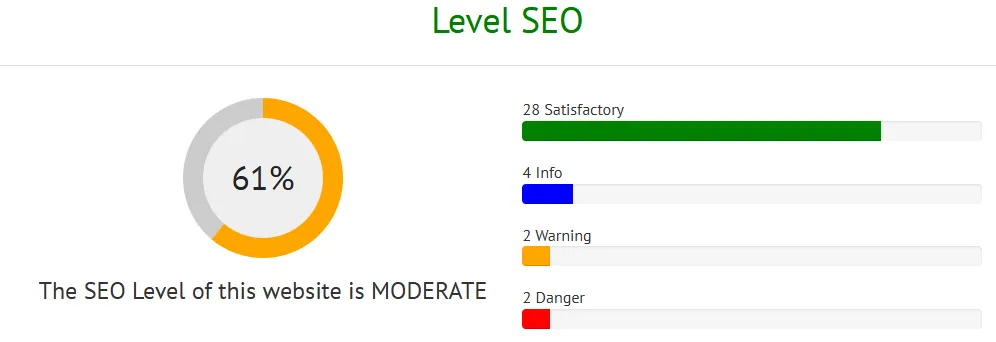
This audit helps you quickly identify where a page is underperforming and how you can fix it without rewriting everything from scratch.
2. Optimize the Basics First
Before diving into advanced tactics, make sure the fundamentals are solid:
-
Your title tag should include your target keyword and stay under 60 characters.
-
The meta description should be enticing and under 160 characters.
-
There should be one H1 tag, ideally matching or complementing your title.
-
Use H2 and H3 headers to break up the content logically.
SEO Site Explorer points out missing or misused tags so you can fix them fast.
3. Improve Keyword Usage (Without Stuffing)
Don't overload your page with the target keyword, but make sure it's present in:
-
The first 100 words of the page
-
At least one header tag
-
The meta description
-
A few natural instances throughout the body
The tool highlights your current keyword density so you can adjust for better readability and SEO value.
4. Add or Improve Internal Links
Linking to related content on your site helps both users and search engines.
If you run a blog, linking older posts to newer, related ones is a great habit that costs nothing but improves crawlability.
Here’s how and why you should add or improve internal links on every page:
1. Guide Search Engine Crawlers
Search engines like Google use internal links to discover and index pages on your website. If a page doesn’t receive any internal links, it's much less likely to be indexed—or ranked.
Adding internal links to new or low-performing pages helps bots find them and understand their context.
2. Distribute Page Authority (Link Equity)
When one of your pages gains authority (through backlinks or high performance), internal links allow you to pass some of that SEO value to other pages.
For example, linking from a well-ranked blog post to a new product page can help that page climb in search results faster.
3. Improve User Experience
Internal links keep users on your site longer by leading them to related content or useful resources. This reduces bounce rate and increases engagement—both of which are positive signals to search engines.
4. Anchor Text Optimization
Internal links give you complete control over the anchor text, the clickable text in a hyperlink. This is your opportunity to include relevant keywords naturally, helping search engines understand what the target page is about.
But be careful: over-optimizing with exact-match keywords can look spammy. Use descriptive, natural-sounding phrases.
5. Identify Orphan Pages
Find orphan pages, those without internal links pointing to them. These pages are often invisible to crawlers and miss out on ranking potential:
-
List all pages with few or no internal links
-
Identify top-performing pages where links could be added
-
Find contextual opportunities for natural linking
6. Create a Logical Site Structure
Well-organized internal linking creates a clear hierarchy across your website. It tells search engines which pages are the most important and how topics are related. This is especially helpful for content clusters and topic-based SEO strategies.
5. Compress and Tag Images
Large, untagged images slow down your page and weaken SEO. Make sure every image:
-
Is compressed to reduce load time
-
Has a descriptive filename
-
Includes an alt attribute with a relevant description
SEO Site Explorer flags missing alt text so you can fix accessibility and SEO in one go.
Optimize Smarter, Not Harder: Get More SEO Results With Less Effort
1. Prioritize High-Impact Pages
You don’t need to optimize your entire site at once. Start with:
-
Pages already getting some traffic
-
Pages with keyword ranking potential
-
High-authority pages that can pass link equity internally
2. Let Data Drive Your Decisions
Stop guessing. Smart optimization starts with understanding what’s actually wrong.
With on-page SEO analysis, you can:
-
Spot missing or weak meta tags
-
Identify broken links or duplicate headers
-
Detect thin content or poor internal linking
This lets you fix real problems instead of wasting time on surface-level changes.
3. Automate What You Can, Focus on Strategy
Repetitive SEO tasks can be automated. Use tools to:
-
Crawl your pages and audit content quickly
-
Generate reports and suggestions automatically
-
Monitor changes and performance over time
Free yourself to focus on the strategic moves, content structure, internal links, keyword targeting, and user intent.
4. Improve What You Already Have
You don’t need to publish new content every week to grow.
Sometimes, updating and optimizing existing content can outperform a brand-new article.
Examples:
-
Refresh outdated statistics or links
-
Add keyword-rich subheadings and sections
-
Link internally to relevant newer content
5. Track, Learn, Repeat
Smart optimization isn’t a one-time task. It’s a feedback loop:
-
Monitor what works (and what doesn’t)
-
See how rankings and traffic respond
-
Apply those insights to future updates
Use metrics, not gut feelings, to guide your next move.