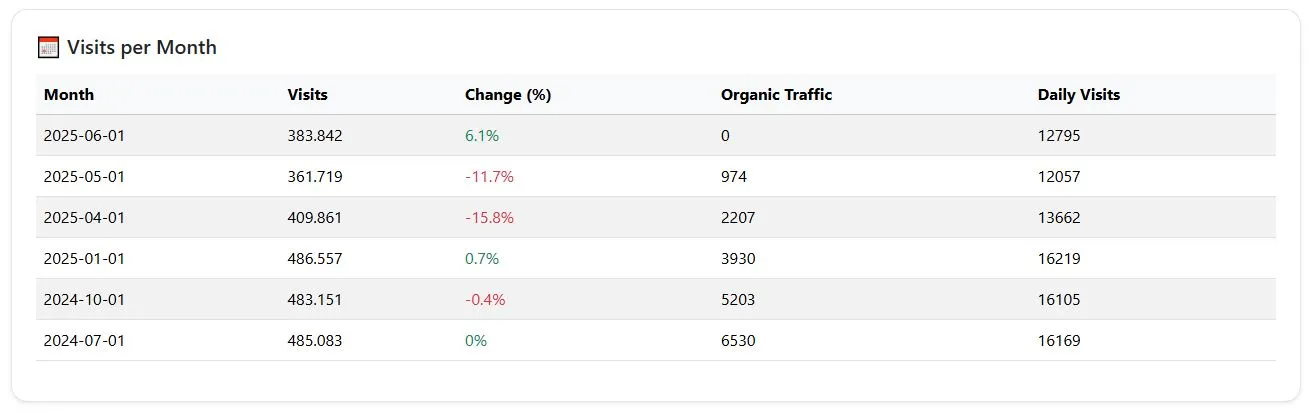
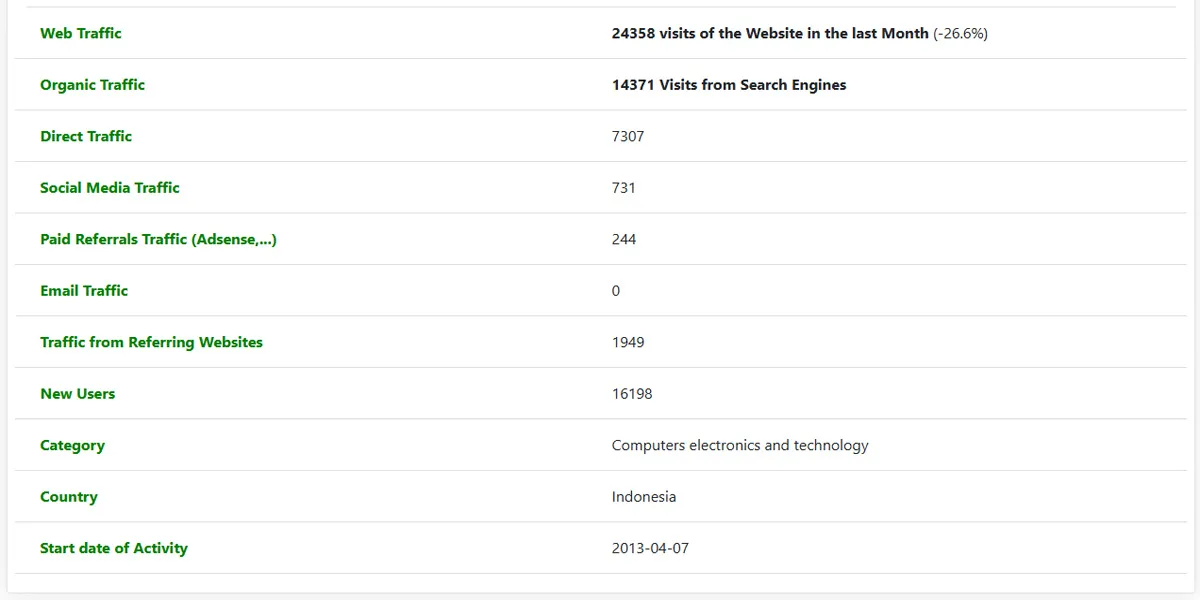
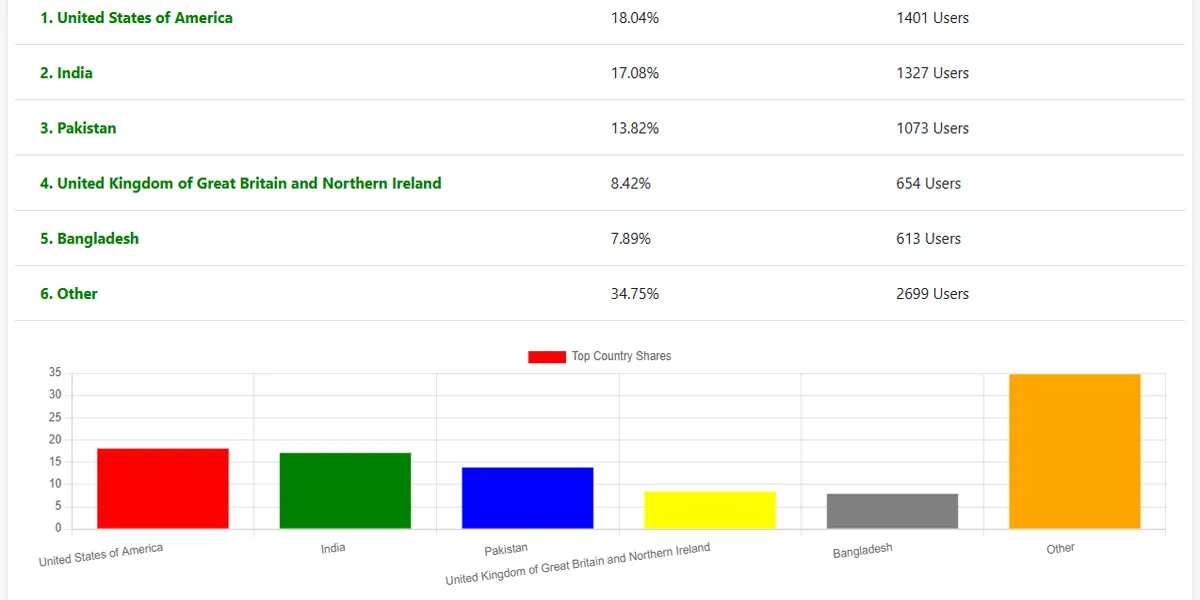
Instantly discover how much traffic a site gets, its evolution over time, sources of visits and more.
๐ฉ Want to save reports and unlock full data?
Get Free AccessCompare your site with similar websites and discover new opportunities to improve performance.
๐ฉ Want to save reports and unlock full data?
Get AccessThis tool is ideal for:
The Website Traffic Checker is a free and powerful analytics tool that gives you in-depth traffic data for any public website. Whether you're analyzing your competition, doing keyword research, or validating market trends, this tool gives you actionable insights in seconds.
The Website Traffic Ckecker tool is a web analytics tool that allows anyone to find out how much monthly traffic a website has received in the last months.
The following are the main points that Website Traffic Ckecker analyzes about any website.
Main features include:
Traffic Source Breakdown:
Audience Demographics:
Device & Platform Analysis:
Geographic and Competitive Data:
It's a tool that allows you to analyze the traffic of any website, displaying data such as the number of visits, traffic sources, devices used, user geographic location, keywords, and much more.
Website traffic Analysis is an online marketing concept that allows website owners to find out what kind of content or information attracts the most readers. This is a key metric for website owners who want to improve their content and marketing strategies.
In addition, analyzing your website traffic helps you determine which marketing methods are working well and which need to be updated or adjusted.
First, you should know how many web users have accessed your website daily over the past months.
No. You can analyze any public website without needing access to its Google Analytics or internal dashboard.
Some of the key data you can view include:
The tool uses public sources, estimates obtained from AI-based algorithms and big data, and web behavior analysis similar to those used by platforms like SimilarWeb, Ahrefs, or Semrush.
Yes, although they are estimates, they are usually very close to reality, especially for sites with significant traffic. It is perfectly suitable for benchmarking and competitive analysis.
Google Analytics shows accurate internal data, but only if you have access to the site's account. Lookkle's Web Traffic Checker performs an external analysis of any website, so it's never going to be that accurate.
Yes, it's one of its most powerful uses. You can see which sites receive the most traffic, where they get it from, and what content performs best for them.
Yes, there's a free version that allows for comprehensive analysis. There are also paid plans with more detailed data and advanced features.
It's not required to use basic features or to analyze just one website per day, but registering gives you access to more features and analysis of more websites.
It may show limited data for sites with low traffic, but it's still useful for seeing general trends and main sources.
Yes, you can see the percentage of traffic and the estimated number of visits coming from each country, showing up to the top 5 countries for pages with more than 1,000 visits per month.
Yes. You can see organic keywords, top pages receiving the most traffic, backlinks, and internal SEO analysis using other common tools.
Completely. It doesn't require you to install anything or access private information. All analysis is external and based on public data.
Analyze how well you're monetizing your web traffic via direct sales and advertising channels. If most of your web users are accessing your site free of charge, you're missing out on a lot of potential revenue. Even if you're luring in advertising clients with high conversion rates, it pays to incentivize visitors with high CPM (cost per thousand) ads via pay-per-click (PPC) advertisements as well! In addition, offering email subscription options for regular updates can bring in steady revenue streams- especially if viewers become avid readers of your website!
Website traffic analysis is an essential tool for web business owners who want to understand what makes their website popular with the public. Analyzing web user behavior allows you to create high-quality content that appeals to specific demographics and business channels alike. Ultimately, increasing web traffic and earning revenue from it is easy once you know how to implement these strategies successfully!
A web page's bounce rate is a metric that shows the percentage of visitors who leave your website without navigating any further. Essentially, it defines how well your site represents your target audience. If a high number of people navigate to your webpage and return without submitting any information, you know that you have created an unappealing web page. On the other hand, if very few people interact with your content, you must have created a gripping one.
The bounce rate indicates how well your site represents your target audience. If most of your visitors are male adults between the ages of 18 and 34, but you only design web pages for children, you need to reconsider your choices. You must choose relevant content for your target group or find a way to attract a wider range of regular visitors. In addition, you can reduce the bounce rate by making your pages easy to navigate. People with busy lifestyles will return to your webpage without success if they find the process too tedious.
You can reduce the bounce rate by providing clear instructions on each page. Provide clear links to each section of your webpage and make sure that each link leads directly to the next page in the sequence. Avoid using complicated navigation because this only frustrates regular visitors and draws them away from your website. In addition, consider adding text links within each web page for additional accessibility options. This allows readers with visual impairments or limited mobility to easily access all the information on your website.
It's also important to add fresh and relevant content to every web page you update. Regular additions increase the number of backlinks pointing to your webpage,
which increases how visible your website is in search engine results pages. In addition, regular updates increase your webpage's relevance as readers
delete old pages from their bookmarks and add new pages for their needs.
However, adding content can improve your bounce rate if you make it relevant to actual reader needs and interests.
Generally speaking, increasing traffic and reducing bounce rates are difficult tasks that require time and effort. Essentially, you must first identify relevant content for your target audience and make it easy for potential readers to navigate your webpage effectively. Regular additions of fresh content also help increase your site's interactivity rate with little effort on the part of the author.
A web page's estimated time on the web is an estimation of the average time that a user spends on a particular web page. Since many people access the Internet from their home or work, time on the web is also an indication of a particular website's popularity. Many people have various experiences with the web, and it is important that publishers keep their content up to date to appeal to all types of users. However, estimating the average time spent on a web page can be challenging, since it depends on a wide variety of variables.
The amount of time spent on a web page is calculated by taking into consideration the number of pages visited and the number of minutes spent on the page.
A user stays on a web page for as long as he chooses- browsing is an individual activity. Therefore, for estimation purposes, one must consider
how long he actually spends browsing. For example, if a user browses for ten minutes and then leaves the website he accessed without purchasing
any goods or services, his total time spent browsing that website would be calculated according to the following formula:
(ten minutes spent browsing) X (the number of pages visited) X 60 seconds = the total time spent browsing the website.
The equation used to calculate average time spent per session is as follows:
(total time spent per session) X (the number of sessions) = (average time spent per session).
To calculate average time spent per session, divide the total amount of time spent on the web page by the total number of sessions. If a user browses from one website to another, his sessions would be split between them. To find out how much time he spends on each website, divide the total amount of time he spent browsing each website by his total number of sessions between those websites. The result would be an average amount of time he spends on each website he browses within his online session.
Estimated web page times are generally estimated using computer software that calculates the amount of time that users spend on different web pages within their browsing sessions. These programs are generally available online through websites that specialize in web traffic estimation, these websites typically offer free samples or tutorials so that visitors can learn how to use their programs.
In addition to calculating how much time someone has spent on a particular web page, these programs can also calculate how many times someone has accessed that webpage and where that person accesses the webpage from. This data can be used to calculate various statistics related to webpage accessibility and visitor behavior.
A website's ranking on Lookkle is a scoring system that ranges from 0 to 100, with 100 being the highest score a site can achieve and 0 being the lowest. A website's ranking on Lookkle is based on the number of visitors it receives.